A free Chessvision.ai alternative for image to FEN
If you have a screenshot or a clear 2D chessboard image and want the position in Lichess, ChessboardScan handles that task in your browser without an account.
It recognizes the pieces, shows an editable board and FEN, and opens the position in Lichess. You can paste an image, choose a PNG, JPEG or WebP file, or use the camera button. The service accepts images up to 15 MB.
ChessboardScan is a focused image-to-FEN tool. It is not a replacement for every Chessvision.ai feature.
How to turn a board image into FEN
- Capture a clear image with the entire 2D board visible. A screenshot from a chess site or a flat printed diagram is a good starting point.
- Open ChessboardScan, then paste or upload the image. On a phone, you can also take a photo with the camera button.
- Review the detected board. Select a piece and tap a square to correct it, or use Remove to clear a square.
- Check whose turn it is, the board orientation, castling rights, and en passant. An image alone often cannot establish those details.
- Use the displayed FEN or press Open in Lichess to analyze the position there.
What the FEN represents
This original diagram illustrates a position after 1. e4 e5 2. Nf3 Nc6 3. Bc4 Nf6 4. c3. The piece placement is visible in the image. The move list tells us that Black is next to move and that both sides still have castling rights; those facts should be checked separately in the scanner.
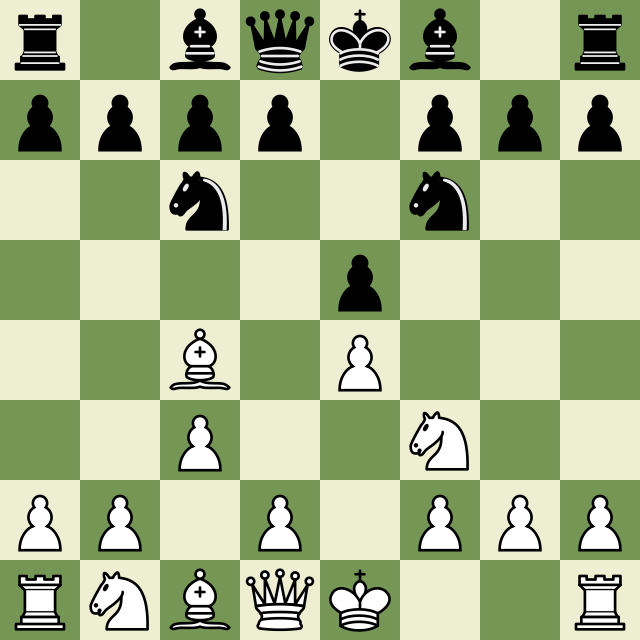
After checking the pieces and setting the game-state fields from that move list, the complete FEN is:
r1bqkb1r/pppp1ppp/2n2n2/4p3/2B1P3/2P2N2/PP1P1PPP/RNBQK2R b KQkq - 0 4
The first field records piece placement. The remaining fields include the side to move, castling rights, en passant target, and move counters. If you have only a picture and no move history, treat those fields as values to verify rather than facts recovered from the image.
ChessboardScan and Chessvision.ai: which fits your task?
| Task | ChessboardScan | Chessvision.ai |
|---|---|---|
| Turn a 2D image into a chess position | Upload or paste an image in the web tool; review the editable FEN board. | Its browser extension and mobile app scan chess positions. |
| Use a browser extension | No extension. | Offers browser extensions. |
| Process chess eBooks | No PDF or eBook reader. | Offers an eBook reader. |
| Explore chess videos | No video scanner or video library. | Offers video tools and a position-based library. |
Chessvision.ai's feature descriptions come from its official product overview. Use ChessboardScan when you want a quick, free image-to-FEN workflow. Choose the other tools when you need their extension, book, or video features.
Common questions
Can I scan a Chess.com or Lichess screenshot?
The scanner is designed for clear 2D boards, including screenshots from those sites. Keep the full board in view and check the result before using it.
Does it analyze moves itself?
No. ChessboardScan prepares an editable position and opens it in Lichess for analysis.
Can I find a chess move from a picture?
Yes, with a review step. Scan the 2D board image, correct any misread pieces and game-state fields, then open the position in Lichess to explore moves. ChessboardScan itself does not calculate the best move.
Will it read a photograph of a physical board?
The current tool is intended for 2D boards and flat diagrams. A perspective photo of a physical board may need a different scanner or manual board setup.